


Alright, folks, gather ’round! Let’s talk Nothing OS 4.0 . The buzz is real, and the update is officially rolling out – or, well, will be rolling out – to a whole bunch of Nothing phones this year. But here’s the thing: it’s not just about getting the latest software. It’s about what this update means for your daily life, your phone’s performance, and, let’s be honest, your bragging rights among your tech-savvy friends. So, let’s get into it.
The “Why” Behind Nothing OS 4.0 | More Than Just a Fresh Coat of Paint
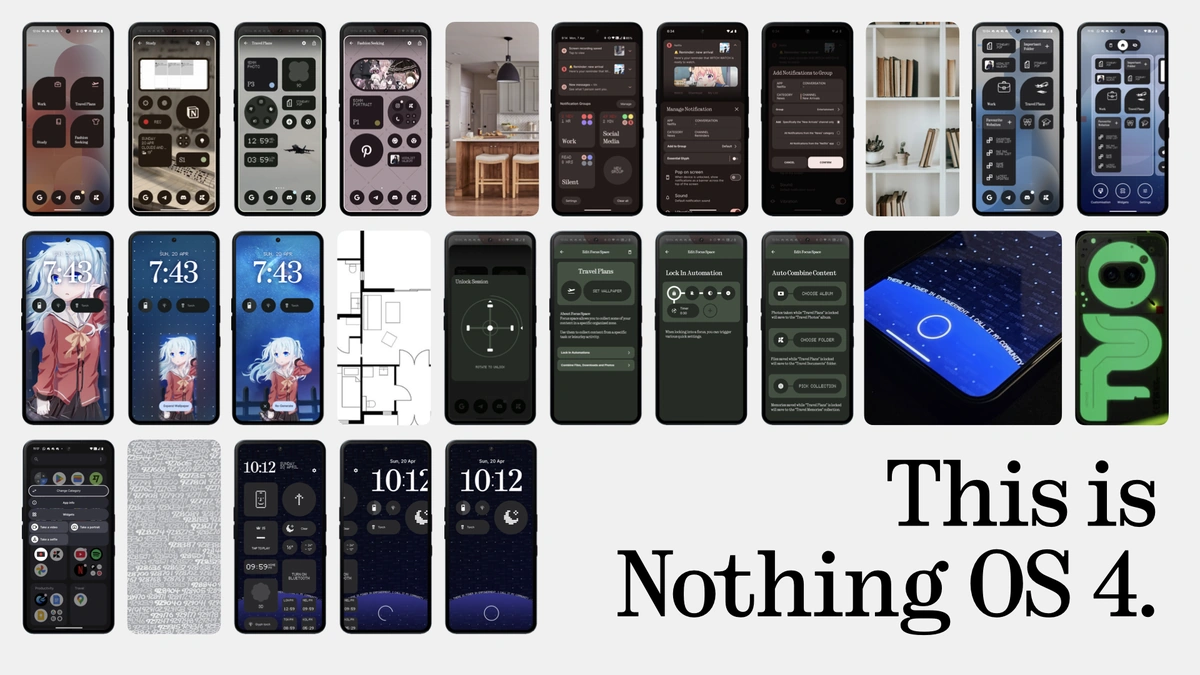
We all know how phone updates usually go, right? A few new emojis, maybe a slightly tweaked settings menu, and a whole lot of promises about “improved performance.” But Nothing OS 4.0 ? This feels different. Carl Pei and the Nothing team have built a brand on doing things differently, and this update seems to be doubling down on that philosophy. It’s not just about aesthetics (though the new glyph interface tweaks are pretty cool). It’s about fundamentally rethinking how we interact with our phones.
Think about it: phone companies typically add features just to stay competitive. Nothing seems focused on removing the bloat. They’re aiming for a streamlined experience, and in the cluttered world of Android, that’s a breath of fresh air. The goal is a more responsive, intuitive, and frankly, joyful user experience. But, will they succeed? That’s the million-dollar question.
What fascinates me is that they are not only releasing this update for their flagship devices but also for their budget offering. That shows how committed they are to providing the best user experience for everyone.
The “How” Angle | Getting Ready for the Nothing OS 4.0 Rollout
Okay, so you’re excited. You want Nothing OS 4.0 on your phone ASAP. What do you need to do? The good news is, for most users, the process will be pretty seamless. But there are a few things you can do to prepare and ensure everything goes smoothly.
First, back up your data. I know, I know, everyone says this, but seriously, do it. Cloud backups, external hard drives – whatever floats your boat. Just make sure your precious photos, videos, and contacts are safe. A common mistake I see people make is assuming that a cloud backup is enough. Always double-check!
Next, check your storage space. Nothing OS 4.0 update , like any major software update, needs room to breathe. Clear out any unnecessary apps, photos, or files. Aim for at least 10GB of free space. You can easily check this in your phone’s settings menu. And while you’re at it, make sure your phone is charged to at least 50%. Nobody wants their phone to die halfway through an update.
Finally, be patient. These updates roll out in phases, so you might not get it on day one. Don’t keep hammering the “Check for Update” button; it won’t make it arrive any faster. Trust me, I’ve tried. As a long-time Android user , I know these things can take time.
The Emotional Angle | The Anxieties and Excitement of a New OS
Let’s be honest, there’s always a bit of anxiety when a new OS rolls out. Will it break my favorite apps? Will it slow down my phone? Will I even like the new interface? These are valid concerns, and we’ve all been there. That moment of panic when you realize you should have backed up your data – ugh, the worst. But, there’s also the excitement, right?
The anticipation of new features, the promise of improved performance, the feeling of having a brand-new phone without actually buying one – that’s the magic of a software update. And with Nothing’s focus on simplicity and user experience, there’s a good reason to be optimistic. This isn’t just about getting the latest version of Android; it’s about getting a phone that feels fresh, responsive, and tailored to your needs.
Nothing OS 4.0 promises to bring enhanced customization options. According to reports, users can expect a more personalized experience, allowing them to tailor their devices to their specific needs and preferences. Nothing Phone (1) and later models are slated to receive this update, solidifying Nothing’s commitment to supporting its existing customer base.
Under the Hood | What’s New in Nothing OS 4.0?
So, what can you actually expect when you finally get your hands on Nothing OS 4.0 ? While the full changelog will vary depending on your specific phone model, here are some of the key highlights:
- Refreshed Glyphs: Nothing’s signature Glyph Interface gets a significant upgrade. Expect more customization options and deeper integration with apps.
- Improved Performance: Speed and efficiency are the name of the game. Expect faster app loading times, smoother animations, and better battery life.
- Enhanced Privacy Features: Nothing is taking your privacy seriously. New tools and settings give you more control over your data.
- New Customization Options: From widgets to themes, Nothing OS 4.0 lets you personalize your phone like never before.
And this is just the tip of the iceberg! There will be a ton of smaller tweaks and improvements that you’ll discover as you use the OS. It’s all about creating a more seamless and enjoyable experience.
Nothing OS 4.0 | Why It Matters for the Indian User
In India, where value for money is king, the efficiency gains promised by the latest Nothing OS are particularly compelling. Battery optimization is critical, as many users rely on their phones extensively throughout the day, often in areas with limited access to charging. The Indian market also highly values customization, allowing users to personalize their devices and express their individuality.
Moreover, with increasing concerns around data privacy, the enhanced privacy features in Nothing OS 4.0 should resonate well. And don’t forget the improved camera software enhancements. Better images and videos directly translate to better social media content, and that’s something everyone cares about.
The Nothing Phone (2) is already a hit in India, and this update will only solidify Nothing’s position in the market. It’s about more than just specs; it’s about providing a genuinely premium and user-friendly experience at a competitive price. I initially thought this was just another update, but then I realized it has the potential to reshape the budget smartphone segment here.
Remember to visit the official Nothing website for the latest and most accurate information.
FAQ | Your Burning Questions About Nothing OS 4.0, Answered
When will my Nothing phone get the update?
Nothing hasn’t announced a specific rollout schedule for each device. However, they’ve confirmed that most Nothing phones will receive the update this year. Keep an eye on Nothing’s social media channels and tech blogs for the latest news.
Will Nothing OS 4.0 slow down my older phone?
Nothing claims that Nothing OS 4.0 is optimized for performance, even on older devices. However, it’s always possible that some older phones may experience a slight slowdown. This is why backing up your data before upgrading is recommended.
What if I don’t like the new interface?
While Nothing OS is known for its minimalist approach, the degree to which you can revert back to the look of an earlier version may be limited. Check online forums for any user-created workarounds, but proceed with caution.
Can I downgrade back to Nothing OS 3.0 if I don’t like 4.0?
Downgrading is generally not recommended and can be risky. It’s best to do some research and be sure you want to install a beta version before you do.
What if I find bugs in Nothing OS 4.0?
Report them to Nothing! They have a dedicated feedback channel where you can submit bug reports. The more information you can provide, the better.
So, there you have it. Nothing OS 4.0 is more than just a software update; it’s a statement. It’s a statement about Nothing’s commitment to simplicity, user experience, and challenging the status quo. It’s a bold move, and it’s one that could pay off big time. I’m personally excited to see where they take things next. The impact of leading smartphones like Nothing will depend on how they listen to their users and adapt their software accordingly.


